Showing posts with label SQL Server DBA. Show all posts

Friday, October 14, 2011

Change Password of SA Login Using Management Studio - SQL SERVER

Change Password of SA Login Using Management Studio - SQL SERVER

Step1: Login into SQL Server using Windows Authentication.


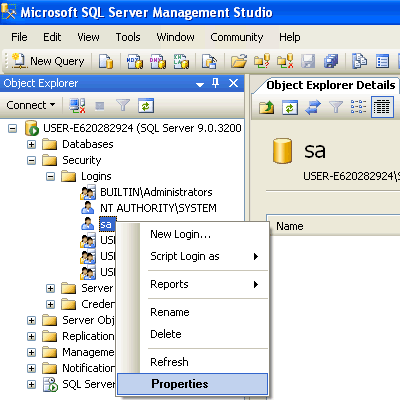
Step2: In Object Explorer, open Security folder, open Logins folder. Right Click on SA account and go to Properties.


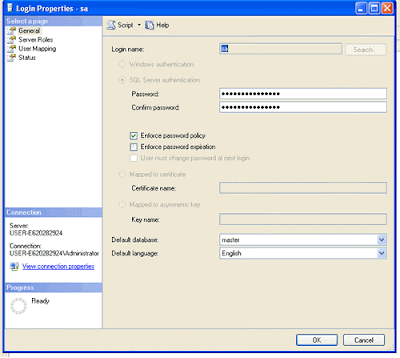
Step3: Change SA password, and confirm it. Click OK.

Make sure to restart the SQL Server and all its services and test new password by log into system using SA login and new password.

Wednesday, December 8, 2010

Error message is: The directory name is invalid in SQL Server

Error Message: in SQL server
An error occurred while executing batch. Error message is: The directory name is invalid.


Reason:
This error will come when your disk space is very low or if the directory is protected.

Solution:check your disk space or try connecting the SQL server from some other machine.


Monday, June 28, 2010

creating the composite index with more than 900 bytes


Creating the composite index with more than 900 bytes:
Sql server is having some constraints while creating the index. The index entry will not allow if the data size is more than 900 bytes. It gives the error while inserting the data.

There is a way to insert the more than 900 bytes into composite index. we see that in this article.

Intial setup:

Creating the table with two columns and total size is more than 900 bytes.

use tempdb
create table tmp
(
c1 varchar(10),
c2 varchar(1000)
)


Index creation:

The create index statement gives the warnings. Because total size is havng more than 900 bytes.

create index idx_tmp on tmp(c1,c2)

Warning! The maximum key length is 900 bytes. The index 'idx_tmp' has maximum length of 1010 bytes. For some combination of large values, the insert/update operation will fail.

Test data Length:
select len('

test_data test_data test_data test_data test_data test_data test_data test_data test_data test_data test_data
')


Insert statement with more than 900 bytes:

The toltal size of the insert is 1010 bytes here. It is not allowing to insert and giving the error.


insert into tmp values( 'hai',
'test_data test_data test_data test_data test_data test_data test_data test_data test_data test_data test_data
test_data test_data test_data test_data test_data test_data test_data test_data test_data test_data test_data
test_data test_data test_data test_data test_data test_data test_data test_data test_data test_data test_data'
)

INCLUDE clause:

There is another way to avoid this error and create a index on both the columns.

drop index idx_tmp on tmp

By using the INCLUDE clause of the CREATE INDEX statement, the index key could be defined as (c1) and c2 defined as a nonkey column. In this way, the index key size would be 10 bytes.


CREATE INDEX idx_tmp2
ON tmp (c1)
INCLUDE (c2);

Insert statement with more than 900 bytes:

The toltal size of the insert is 1010 bytes here. This time it is allowing to insert

insert into tmp values( 'hai',
'test_data test_data test_data test_data test_data test_data test_data test_data test_data test_data test_data
test_data test_data test_data test_data test_data test_data test_data test_data test_data test_data test_data
test_data test_data test_data test_data test_data test_data test_data test_data test_data test_data test_data'
)


The index has included both the columns. The below query proves that.

select b.name index_name,a.name column_name from sys.columns a
inner join sys.indexes b
on a.object_id=b.object_id
where b.name ='idx_tmp2'


Addition to that we verify the explain plan. It goes for the index scan.
select * from tmp where c1='10'


select * from tmp where c2='10'


Wednesday, June 2, 2010

Partitioning in SQL server


Partitioning in SQL server with small sample:


Summary: Table partitioning can make very large tables and indexes easier to manage, and improve the performance of appropriately filtered queries.

Table Partitioning Components:

The partition function, partition scheme, and partitioned table or index form a dependency tree, with the partition function at the top, the partition scheme depending on the partition function, and then the partitioned table or index depending on being linked to a partition scheme.


Partition function:
The partition function defines the boundary values of the initial set of partitions and the data type of the partitioned column:
o It makes no reference to any tables or disk storage.
o It forms the basis for one or more partition schemes.


create PARTITION function PF_dept(int)
AS range right FOR values (10,20,30)

Partition scheme:
The partition scheme maps particular partitions to filegroups:
o A given partition scheme can be used for one or more partitioned tables, indexes, and indexed views.
create partition scheme ps_dept
as partition PF_dept
TO (FG1,FG2,FG3,FG4)

Partitioned table:
The partitioned table or index is tied to a particular partition scheme when it is created:
o The partition table has only an indirect relationship, through the partition scheme, to the partition function.
create table dept
(deptid int,
deptname varchar(10)
)
ON ps_dept(deptid)


CREATE TABLE EMP
(EMPID INT,
EMPNAME VARCHAR(10),
DEPT_ID INT)
ON PS_DEPT(DEPT_ID)

Enable xp_cmdshell on a MS SQL Server Instance

Enable xp_cmdshell on a MS SQL Server Instance :

xp_cmdshell has the power to make modifications on the outer world of SQL Server. So this power has to be controlled in the security concepts and be manageable. In the early versions of Microsoft SQL Server the xp_cmdshell extended procedure was enabled default. This caused some security gaps for SQL Server owners. Although some administrators do not use xp_cmdshell functionality, it was out of control and can be used in an unsecure way by a sql server developer. Microsoft now enables SQL Server administrators to enable or disable the xp_cmdshell extenden procedure and releases the SQL Server products with xp_cmdshell is disabled fby default. So if you think you are capable of taking the security risks and prevent those risks you can enable xp_cmdshell by using the sp_configure stored procedure.
The below t-sql code displays how xp_cmdshell can be used to delete a file named delete-me-file.txt in the root folder of C drive


xp_cmdshell 'del c:\delete-me-file.txt'

Since the xp_cmdshell extended procedure has not been enabled yet, the SQL Server will return the following error and warning message:


Msg 15281, Level 16, State 1, Procedure xp_cmdshell, Line 1SQL Server blocked access to procedure 'sys.xp_cmdshell' of component 'xp_cmdshell' because this component is turned off as part of the security configuration for this server. A system administrator can enable the use of 'xp_cmdshell' by using sp_configure. For more information about enabling 'xp_cmdshell', see "Surface Area Configuration" in SQL Server Books Online.
Actually the warning message is self explaining in details. We can either enable the sys.xp_cmdshell procedure by using sp_configure or by using the SQL Server Surface Area Configuration Tool.Of course in order to make configuration changes on the sql server, you have to have the system administrator rights or permissions on the SQL Server instance.

Enable xp_cmdshell using sp_configure:
exec sp_configure
go
exec sp_configure 'xp_cmdshell', 1
-- Configuration option 'xp_cmdshell' changed from 0 to 1. Run the RECONFIGURE statement to install.
go
reconfigure
go
When you run the exec sp_configure t-sql command, you will see a returned list of configuration values for the related SQL Server installation.The last row of the configuration list is probably displaying values of xp_cmdshell.config_value and run_value columns are displaying if xp_cmdshell is enabled and if this change is reflected to the running configuration values.exec sp_configure 'xp_cmdshell', 1 sql command sets the configuration value ("config_value") to 1 which means enable.And the last t-sql code or command reconfigure sets the running value to enabled in a way reflects the changes to the running server configurations.

How to delete a file using xp_cmdshell extended procedure:


After enabling xp_cmdshell it is straight forward for deleting a file from the file system if you have the necessary permissions on the file object for the user who is running the xp_cmdshell procedure.

xp_cmdshell 'del c:\delete-me-file.txt'
Sysname

About Sysname:

The sysname data type is used for table columns, variables, and stored procedure parameters that store object names. The exact definition of sysname is related to the rules for identifiers. Therefore, it can vary between instances of SQL Server. sysname is functionally the same as nvarchar(128) except that, by default, sysname is NOT NULL. In earlier versions of SQL Server, sysname is defined as varchar(30).

Example:

declare @path sysname