Showing posts with label SQL Server. Show all posts

Sunday, May 12, 2013

Error message 402: The data types ntext and varchar are incompatible in the equal to operator.


where clause with ntext in SQL server:

I have a column of type ntext in SQL server how can I evaluate it in a WHERE clause.


Structure of the Table:

sp_help Priorities


Coulumn_name           Type

---------------------------------------------------

PriorityId                      int

ProjectId                      int

Priority                         nvarchar

Description                   ntext


Sample :

select * from Priorities

where Description = 'High'


The error message for the above Query:

Msg 402, Level 16, State 1, Line 2

The data types ntext and varchar are incompatible in the equal to operator.


Solution:

select * from Priorities
where cast(Description as nvarchar(max)) = 'High'


Friday, October 14, 2011

Change Password of SA Login Using Management Studio - SQL SERVER

Change Password of SA Login Using Management Studio - SQL SERVER

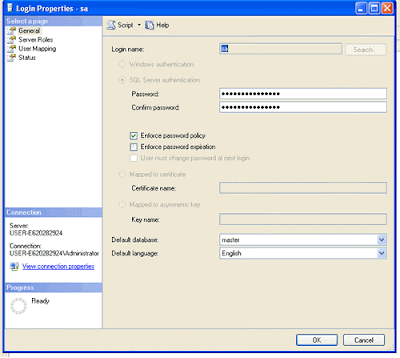
Step1: Login into SQL Server using Windows Authentication.


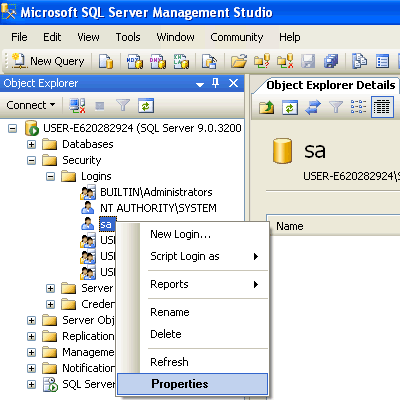
Step2: In Object Explorer, open Security folder, open Logins folder. Right Click on SA account and go to Properties.


Step3: Change SA password, and confirm it. Click OK.

Make sure to restart the SQL Server and all its services and test new password by log into system using SA login and new password.

Saturday, February 12, 2011

Order by based on the parameter passed in SQL server:


Order by based on the parameter passed in SQL server:
Dynamically ordering a result set based on the parameter passed is a powerful technique for ordering your data. The below example shows that and see the issues which we faces.


Initial setup:
create table dept
(
deptid int,
deptname varchar(10)
)

insert into dept values (1,'Sales')
insert into dept values (4,'Production')
insert into dept values (3,'fiance')
insert into dept values (2,'HR')

The following SQL script shows how you might try to use a CASE expression to dynamically order a result set:

DECLARE @OrderByOption int
SET @OrderByOption = 1 SELECT deptid
,deptname
FROM dept
ORDER BY
CASE
WHEN @OrderByOption = 1 THEN deptid
WHEN @OrderByOption = 2 THEN deptname
END

deptid deptname
----------- ----------
1 Sales
2 HR
3 fiance
4 Production

(4 row(s) affected)


The script works well if the value of @OrderByOption is set to 1. We change the value as 2 and try.

DECLARE @OrderByOption int
SET @OrderByOption = 2 SELECT deptid
,deptname
FROM dept
ORDER BY
CASE
WHEN @OrderByOption = 1 THEN deptid
WHEN @OrderByOption = 2 THEN deptname
END

Msg 245, Level 16, State 1, Line 2
Conversion failed when converting the varchar value 'Sales' to data type int.

Conceptually, the query offers the ability to order by either the deptid column or the deptname column based on the current value of @OrderByOption. The above statement attempts to order by deptname, but produces the error, " Msg 245, Level 16, State 1, Line 2 Conversion failed when converting the varchar value 'Sales' to data type int "


Why the query works when the value for @OrderByOption is set to 1 but doesn't work when the value is set to 2, we need to recognize that the two THEN conditions of the CASE statement reference expressions of different data types. In this case, SQL Server implicitly converts the data type for the entire CASE expression to the data type in the THEN clause that has the highest order of data-type precedence.

In this example, the CASE statement has two possible values that follow a THEN clause: deptid, which is an integer data type, and deptname, which is a varchar data type. The integer data type has a higher precedence than the varchar data type, so SQL Server attempts to cast the deptname expression as an integer if you try to order by that column. Such a conversion isn't allowed, so SQL Server generates the above error.
We can work around this problem by using multiple CASE statements, as the following example shows:

DECLARE @OrderByOption int
SET @OrderByOption = 2 SELECT deptid
,deptname
FROM dept
ORDER BY
CASE WHEN @OrderByOption = 1 THEN deptid END,
CASE WHEN @OrderByOption = 2 THEN deptname END

deptid deptname
----------- ----------
3 fiance
2 HR
4 Production
1 Sales

Wednesday, January 5, 2011

Schema Binding in SQL server

Schema Binding :
Creating a view with the SCHEMABINDING option locks the tables being referred by the view and prevents any changes that may change the table schema.

Notice two important points while creating a view with SCHEMABINDING OPTION:
1. The objects should be referred to by their owner names (two part name - [ownername.objectname] ).
2. SELECT * is not permitted.


We see that using below scripts.
create table schema_binding_table
(
id int,
msg varchar(10)
)

insert into schema_binding_table values
(1,'msg1'),
(2,'msg2'),
(3,'msg3')

select * from schema_binding_table

id msg
----------- ----------
1 msg1
2 msg2
3 msg3

(3 row(s) affected)


Chance for erros while creating view with schema binding:
The below error messgae clearly mention that SELECT * is not permitted whille creating the view with schema binding.

CREATE VIEW schema_binding_VIEW WITH SCHEMABINDING AS
SELECT * FROM schema_binding_table


Msg 1054, Level 15, State 6, Procedure schema_binding_VIEW, Line 2
Syntax '*' is not allowed in schema-bound objects.


Be aware that if you do not use the schema name, (dbo) in this case, then you will get the following error while creating the view.

CREATE VIEW schema_binding_VIEW WITH SCHEMABINDING AS
SELECT id,msg FROM schema_binding_table


Msg 4512, Level 16, State 3, Procedure schema_binding_VIEW, Line 2
Cannot schema bind view 'schema_binding_VIEW' because name 'schema_binding_table' is invalid for schema binding. Names must be in two-part format and an object cannot reference itself.


Successful syntax:
CREATE VIEW schema_binding_VIEW WITH SCHEMABINDING AS
SELECT id,msg FROM dbo.schema_binding_table

Command(s) completed successfully.

We know that without schema binding there was no issue to alter or drop the base table without any type of warning or error. Now if we try to alter the table structure or drop the table, we are going to get this error message.

1. Drop table:


drop table schema_binding_table
Msg 3729, Level 16, State 1, Line 1
Cannot DROP TABLE 'schema_binding_table' because it is being referenced by object 'schema_binding_VIEW'.

2. Alter table:
alter table schema_binding_table alter column msg varchar(20)
Msg 5074, Level 16, State 1, Line 1
The object 'schema_binding_VIEW' is dependent on column 'msg'.
Msg 4922, Level 16, State 9, Line 1
ALTER TABLE ALTER COLUMN msg failed because one or more objects access this column.

Thursday, December 30, 2010

Simulating ORACLE ROWNUM in SQL Server

Simulating ORACLE ROWNUM in SQL Server:
Here is the approach you can use to generate a pseudo row number in SQL Server.

The table format and data:

select * from A

c1 c2
-----
101 0
102 0
103 0

(3 row(s) affected)


Approach 1:
select rank=count(*),a.c1,a.c2 from A a ,A b
where a.c1+a.c2 > = b.c1+b.c2
group by a.c1,a.c2


rank c1 c2
-----------
1 101 0
2 102 0
3 103 0

(3 row(s) affected)


Approach 2 :
select rank() OVER (ORDER BY a.c1,a.c2) as rank,a.c1,a.c2
from A a
order by rank

rank c1 c2
--------------------
1 101 0
2 102 0
3 103 0

(3 row(s) affected)


Finally very very simple method:
drop table #T
Select IDENTITY(int, 1,1) id, * INTO #T from A
Select * from #T


id c1 c2
-----------
1 101 0
2 102 0
3 103 0

(3 row(s) affected)

Wednesday, December 29, 2010

EXECUTE AS and REVERT:

EXECUTE AS and REVERT:
The EXECUTE AS and the REVERT are used to change the execution logins. We see the example to change the connection details and coming back to old one.


The client has connected using the “Test” user and “EXECUTE AS” statement changes the Login connection as “Demo” user. The second result set shows that.

The REVERT command switches the execution context back to the Test user.

Explanation about the keywords:
EXECUTE AS Clause - helps us to define the execution context.

REVERT - Switches the execution context back to the caller of the last EXECUTE AS statement

SUSER_NAME() - Returns the login identification name of the user.

USER_NAME() - Returns a database user name.

Wednesday, December 8, 2010

Error message is: The directory name is invalid in SQL Server

Error Message: in SQL server
An error occurred while executing batch. Error message is: The directory name is invalid.


Reason:
This error will come when your disk space is very low or if the directory is protected.

Solution:check your disk space or try connecting the SQL server from some other machine.


Sunday, November 7, 2010

Careful with SQL server Update

Careful with SQL server Update:
The Blog is sharing my experience with the update statement in SQL server. We need to careful when write a update statement in SQL server like a scenarios below.

Initial setup:

create table A
( c1 int,
c2 int
)

create table B
( c1 int,
c2 int
)

insert into A values (101,0)
insert into A values (102,0)
insert into A values (103,0)

insert into B values (101,7)
insert into B values (102,5)
insert into B values (103,4)
insert into B values (103,6)


Tables with value:


select * from A


select * from B


The field in c2 is having Zero for all the fields. We need to update the field c2 in table A from the table B. But we have multiple values in table B for the value 103.


Based on the above scenario, the update statement has to fail. We mostly use the Inner join method of updates in SQL server Like a below statement.

begin tran
update A
set A.c2=B.c2
from A,B
where A.c1=B.c1

The above statement is updating the records. The above method is taking care of the multiple records.


The below method is giving the error message due to multiple records.

begin tran
update A set A.c2
=(select B.c2 from B
where A.c1=B.c1
)

We need to careful when we write a update statements.

Wednesday, August 11, 2010

Output clause

Output clause:

OUTPUT clause has accesses to inserted and deleted tables just like triggers. OUTPUT clause can be used to return values to client clause. OUTPUT clause can be used with INSERT, UPDATE, or DELETE to identify the actual rows affected by these statements.


Let us understand OUTPUT clause using example.

Initial setup:


create table #t
(id int,
p_name char(10)
)

insert into #t values ( 1,'AAAAA')
insert into #t values ( 2,'BBBBB')
insert into #t values ( 3,'CCCCC')
insert into #t values ( 4,'DDDDD')
insert into #t values ( 5,'EEEEE')

select * from #t


Scneario1:

Archive the records into #t_arc table when records get deleted in #t table.

Normal solution is that, insert into #t_arc table before delete the records in the #t table based on the conditions.

create table #t_arc
(id int,
p_name char(10)
)

insert into #t_arc
select * from
where id =3

delete from #t
where id =3

The output clause avoids the execution of the two statements.

delete from #t
output deleted.* into #t_arc
where id =3


One of the very good advantages is eliminating the data access from table for each time. The DELETE … OUTPUT statement access the data once and do the operations.

Scneario2:
We see another example when we insert the data into table.

create table #t_audit
(id int,
load_time datetime
)


The below statement loads the audit table when loads the data into #t table.

insert into #t
output inserted.id,getdate() into #t_audit
values ( 6,'FFFFF')


Monday, June 28, 2010

creating the composite index with more than 900 bytes


Creating the composite index with more than 900 bytes:
Sql server is having some constraints while creating the index. The index entry will not allow if the data size is more than 900 bytes. It gives the error while inserting the data.

There is a way to insert the more than 900 bytes into composite index. we see that in this article.

Intial setup:

Creating the table with two columns and total size is more than 900 bytes.

use tempdb
create table tmp
(
c1 varchar(10),
c2 varchar(1000)
)


Index creation:

The create index statement gives the warnings. Because total size is havng more than 900 bytes.

create index idx_tmp on tmp(c1,c2)

Warning! The maximum key length is 900 bytes. The index 'idx_tmp' has maximum length of 1010 bytes. For some combination of large values, the insert/update operation will fail.

Test data Length:
select len('

test_data test_data test_data test_data test_data test_data test_data test_data test_data test_data test_data
')


Insert statement with more than 900 bytes:

The toltal size of the insert is 1010 bytes here. It is not allowing to insert and giving the error.


insert into tmp values( 'hai',
'test_data test_data test_data test_data test_data test_data test_data test_data test_data test_data test_data
test_data test_data test_data test_data test_data test_data test_data test_data test_data test_data test_data
test_data test_data test_data test_data test_data test_data test_data test_data test_data test_data test_data'
)

INCLUDE clause:

There is another way to avoid this error and create a index on both the columns.

drop index idx_tmp on tmp

By using the INCLUDE clause of the CREATE INDEX statement, the index key could be defined as (c1) and c2 defined as a nonkey column. In this way, the index key size would be 10 bytes.


CREATE INDEX idx_tmp2
ON tmp (c1)
INCLUDE (c2);

Insert statement with more than 900 bytes:

The toltal size of the insert is 1010 bytes here. This time it is allowing to insert

insert into tmp values( 'hai',
'test_data test_data test_data test_data test_data test_data test_data test_data test_data test_data test_data
test_data test_data test_data test_data test_data test_data test_data test_data test_data test_data test_data
test_data test_data test_data test_data test_data test_data test_data test_data test_data test_data test_data'
)


The index has included both the columns. The below query proves that.

select b.name index_name,a.name column_name from sys.columns a
inner join sys.indexes b
on a.object_id=b.object_id
where b.name ='idx_tmp2'


Addition to that we verify the explain plan. It goes for the index scan.
select * from tmp where c1='10'


select * from tmp where c2='10'


Tuesday, June 22, 2010

Good to Know in SQL server 2008

Good to Know in SQL server 2008

1. Insert values:

Many times we use “INSERT INTO tab_name VALUES (….) “way for inserting the data into table. There is a simple way in the SQL server 2008 to avoid multiple INSERT clauses for more than one record. It is possible in single statement.


use tempdb

Create table Dept(Id int, DName varchar(100))

Insert into Dept
values
(1,'A'),
(2,'B'),
(3,'C'),
(4,'D')

select * from Dept


2.Declare and initiate in same lines:

Old style ( SQL 2000 and 2005) :

declare @i int
set @i = 10
declare @dt datetime
set @dt = GETDATE()
select @i as Col1, @dt as Col2


New Style (SQL server2008):

declare @i int = 10
declare @dt datetime = getdate()
select @i as Col1, @dt col2
go

Monday, June 21, 2010

Pivot in SQL server

PIVOT:

PIVOT rotates a table-valued expression by turning the unique values from one column in the expression into multiple columns in the output, and performs aggregations where they are required on any remaining column values that are wanted in the final output.

CREATE TABLE Sales (Make varchar(8), Year int, Sales int)
GO
Insert into Sales values ('Honda',2005,20000)
Insert into Sales values ('Honda',2005,60000)
Insert into Sales values ('Mahindra',2005,40000)
Insert into Sales values ('Honda',2006,30000)
Insert into Sales values ('Mahindra',2006,30000)
Insert into Sales values ('Mahindra',2006,60000)
Insert into Sales values ('Mahindra',2007,8000)
GO

Actual Group by, get Number of cars sold for each make in each year.
Select Make,YEAR,SUM(Sales) from Sales
group by Make,Year

Transposed of above query

Select * from Sales pivot(Sum(sales) for Year in ([2001],[2002],[2003],[2004],[2005],[2006],[2007])) t
go


Restricting the columns which we need to show.

Select * from Sales pivot(Sum(sales) for Year in ([2005],[2006],[2007])) t


List sum of each product sold for each year and product should have been sold all the years and not just 1 year.

Select * from Sales pivot(Sum(sales) for Year in ([2005],[2006],[2007])) t
where [2007] is not null


Monday, June 7, 2010

Cumulative Sum

Ways to get a Cumulative Sum:

Initial setup:
Creating the table and populating the table.

CREATE TABLE #Sales (DayCount smallint, Sales money, RunningTotal money)


INSERT INTO #Sales (DayCount, Sales, RunningTotal)
SELECT 1, 10, 0
union all
SELECT 2, 7, 0
union all
SELECT 3, 2, 0
union all
SELECT 4, 6, 0

GO

SELECT * FROM #Sales ORDER BY DayCount

GO


Method 1:
DECLARE @RunningTotal money
SET @RunningTotal = 0

UPDATE #Sales
SET @RunningTotal = RunningTotal = @RunningTotal + Sales

GO

SELECT * FROM #Sales ORDER BY DayCount

GO


Method 2:

SELECT
a.DayCount
, a.Sales
, SUM(b.Sales) AS 'Running Total'
FROM
#Sales a
JOIN #Sales b ON b.DayCount <= a.DayCount GROUP BY a.DayCount , a.Sales ORDER BY a.DayCount , a.Sales

Wednesday, June 2, 2010

Partitioning in SQL server


Partitioning in SQL server with small sample:


Summary: Table partitioning can make very large tables and indexes easier to manage, and improve the performance of appropriately filtered queries.

Table Partitioning Components:

The partition function, partition scheme, and partitioned table or index form a dependency tree, with the partition function at the top, the partition scheme depending on the partition function, and then the partitioned table or index depending on being linked to a partition scheme.


Partition function:
The partition function defines the boundary values of the initial set of partitions and the data type of the partitioned column:
o It makes no reference to any tables or disk storage.
o It forms the basis for one or more partition schemes.


create PARTITION function PF_dept(int)
AS range right FOR values (10,20,30)

Partition scheme:
The partition scheme maps particular partitions to filegroups:
o A given partition scheme can be used for one or more partitioned tables, indexes, and indexed views.
create partition scheme ps_dept
as partition PF_dept
TO (FG1,FG2,FG3,FG4)

Partitioned table:
The partitioned table or index is tied to a particular partition scheme when it is created:
o The partition table has only an indirect relationship, through the partition scheme, to the partition function.
create table dept
(deptid int,
deptname varchar(10)
)
ON ps_dept(deptid)


CREATE TABLE EMP
(EMPID INT,
EMPNAME VARCHAR(10),
DEPT_ID INT)
ON PS_DEPT(DEPT_ID)

WITH TIES

WITH TIES in SQL server

Specifies that additional rows be returned from the base result set with the same value in the ORDER BY columns appearing as the last of the TOP n (PERCENT) rows. TOP...WITH TIES can be specified only in SELECT statements, and only if an ORDER BY clause is specified.

create table sales( customer_name varchar(10), sales_amount int)

insert into sales values
('A',6000),
('B',6000),
('C',10000),
('D',12000),
('E',13000),
('F',15000),
('G',5000),
('H',4000)

Top 5:
The “Top 5” gives first 5 records based on the condition in query.

select top 5 * from sales
order by sales_amount desc

customer_name sales_amount
------------- ------------
F 15000
E 13000
D 12000
C 10000
B 6000

(5 row(s) affected)

Top 5 WITH TIES:
The “Top 5 WITH TIES” gives 6 records because the base result set with the same value in the ORDER BY columns appearing as the last of the TOP 5.

select top 5 WITH TIES * from sales
order by sales_amount desc

customer_name sales_amount
------------- ------------
F 15000
E 13000
D 12000
C 10000
A 6000
B 6000

(6 row(s) affected)

Comparing the Contents of Two Tables in SQL Server

Comparing the Contents of Two Tables:

create table a
(
c1 int,
c2 varchar(3),
c3 varchar(3)
)


create table b
(
c1 int,
c2 varchar(3),
c3 varchar(3)
)

insert into a values(1,'x','y')
insert into a values(2,'xx','y')
insert into a values(3,'x','y')

insert into b values(1,'x','y')
insert into b values(2,'x','y')
insert into b values(3,'x','yy')

select * from a

C1 C2 C3
----- -- --
1 x y
2 xx y
3 x y

select * from b
C1 C2 C3
----- -- --
1 x y
2 x y
3 x yy


The first rows are the same, but the second and third rows differ. This is how we can find them:
select i.c1,i.c2, i.c3,
count(i.src1) CNT1,
count(i.src2) CNT2
from
( select a.*,
1 src1,
null as src2
from a
union all
select b.*,
null as src1,
2 src2
from b
)i
group by i.c1,i.c2,i.c3
having count(i.src1) <> count(i.src2)


C1 C2 C3 CNT1 CNT2
--- -- -- ---- ----
2 x y 0 1
2 xx y 1 0
3 x y 1 0
3 x yy 0 1


The below link having the script in Oracle:

http://karthikeyanbaskaran.blogspot.com/2010/02/comparing-contents-of-two-tables.html

Spool operation in SQL server


SQL Server doesn't have a SPOOL command like Oracle does for writing to files,
But there are other ways of doing what we want.

1. For reading, use xp_cmdshell and the ECHO command. Use the > or >> redirection symbols to either create or append to a file.

xp_cmdshell "@ECHO test message >> C:\file.fil"
2. Put the information you want into a table (note this can't be an ordinary temporary table, but it can be a global temporary table) and then bcp it out to a file via xp_cmdshell.

xp_cmdshell "bcp .. out c:\file.fil -Usa -P -c"
3. Run the select through ISQL via xp_cmdshell and use the -o parameter to output the results to a file. This example uses the -E parameter to avoild hard-coding a userid.

declare @str varchar(255)
select @str = 'isql -Q"select * from " -E -oc:\file.fil'
exec master..xp_cmdshell @str

Enable xp_cmdshell on a MS SQL Server Instance

Enable xp_cmdshell on a MS SQL Server Instance :

xp_cmdshell has the power to make modifications on the outer world of SQL Server. So this power has to be controlled in the security concepts and be manageable. In the early versions of Microsoft SQL Server the xp_cmdshell extended procedure was enabled default. This caused some security gaps for SQL Server owners. Although some administrators do not use xp_cmdshell functionality, it was out of control and can be used in an unsecure way by a sql server developer. Microsoft now enables SQL Server administrators to enable or disable the xp_cmdshell extenden procedure and releases the SQL Server products with xp_cmdshell is disabled fby default. So if you think you are capable of taking the security risks and prevent those risks you can enable xp_cmdshell by using the sp_configure stored procedure.
The below t-sql code displays how xp_cmdshell can be used to delete a file named delete-me-file.txt in the root folder of C drive


xp_cmdshell 'del c:\delete-me-file.txt'

Since the xp_cmdshell extended procedure has not been enabled yet, the SQL Server will return the following error and warning message:


Msg 15281, Level 16, State 1, Procedure xp_cmdshell, Line 1SQL Server blocked access to procedure 'sys.xp_cmdshell' of component 'xp_cmdshell' because this component is turned off as part of the security configuration for this server. A system administrator can enable the use of 'xp_cmdshell' by using sp_configure. For more information about enabling 'xp_cmdshell', see "Surface Area Configuration" in SQL Server Books Online.
Actually the warning message is self explaining in details. We can either enable the sys.xp_cmdshell procedure by using sp_configure or by using the SQL Server Surface Area Configuration Tool.Of course in order to make configuration changes on the sql server, you have to have the system administrator rights or permissions on the SQL Server instance.

Enable xp_cmdshell using sp_configure:
exec sp_configure
go
exec sp_configure 'xp_cmdshell', 1
-- Configuration option 'xp_cmdshell' changed from 0 to 1. Run the RECONFIGURE statement to install.
go
reconfigure
go
When you run the exec sp_configure t-sql command, you will see a returned list of configuration values for the related SQL Server installation.The last row of the configuration list is probably displaying values of xp_cmdshell.config_value and run_value columns are displaying if xp_cmdshell is enabled and if this change is reflected to the running configuration values.exec sp_configure 'xp_cmdshell', 1 sql command sets the configuration value ("config_value") to 1 which means enable.And the last t-sql code or command reconfigure sets the running value to enabled in a way reflects the changes to the running server configurations.

How to delete a file using xp_cmdshell extended procedure:


After enabling xp_cmdshell it is straight forward for deleting a file from the file system if you have the necessary permissions on the file object for the user who is running the xp_cmdshell procedure.

xp_cmdshell 'del c:\delete-me-file.txt'

Sysname

About Sysname:

The sysname data type is used for table columns, variables, and stored procedure parameters that store object names. The exact definition of sysname is related to the rules for identifiers. Therefore, it can vary between instances of SQL Server. sysname is functionally the same as nvarchar(128) except that, by default, sysname is NOT NULL. In earlier versions of SQL Server, sysname is defined as varchar(30).

Example:

declare @path sysname

Read file names from the folder

Stored procedure to read the filenames:

create procedure spReadFolder @path sysname
as
begin
set nocount on

declare @dirfile table(
id int identity(1,1),
FileName sysname NULL )

declare @cmd nvarchar(512)
set @cmd = 'DIR /b ' + @path

insert into @dirfile
exec master..xp_cmdshell @cmd

select * from @dirfile

end

go
Execute stored procedure:

declare @path sysname
set @path = 'D:\SQL_folder'

exec spReadFolder @path

go